


Specialized Ribbon ink for high-end barcode printers
1. What is Ribbon Ink?
Ribbons are specialized inks for barcode printers. Considered an essential part of barcode printers, they can withstand some mild chemicals and short periods of outdoor exposure. The ink is usually rolled up like a ribbon.

2. Structure of ribbon ink
– Base ribbon layer: is polyester lm, good heat conduction, durable and withstands great tension. The thickness of the base ribbon is usually 4.5 ± 1.0 μm. The size is usually 110mm x 300m, high quality, resistant to outdoor environments, office environments, difficult to dissolve in water, long-lasting in solvents such as gasoline, alcohol, grease ...
– Ink layer: Used on one side of the base ribbon. If the ink sticks from the outside, the Ink Roll is called Face out, and if the ink sticks from the inside, it is called Face in. Depending on the type of barcode printer, the appropriate type of ribbon ink will be the inner or outer ribbon. The ink side in contact with the printer (thermal printer)
– Protective coating: Coated on one side of the base tape. This side faces the print head to absorb heat, burning and melting the ink on the other side, creating a print mark on the print. Thermal printing paper: ATM printing paper, receipt printing paper, electricity and water number printing paper, fax, barcode printing paper, etc.
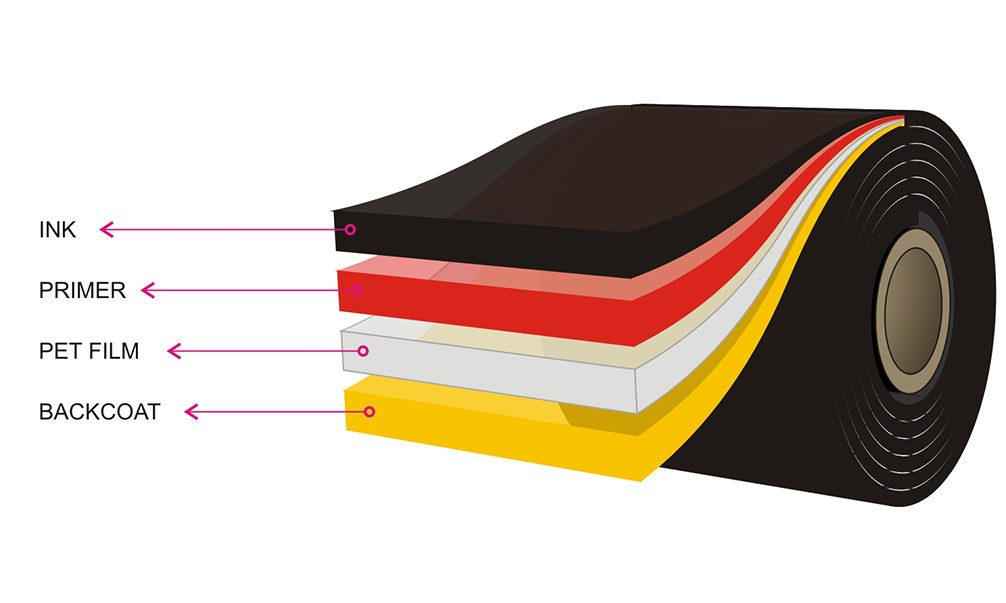
Ribbon ink
– Protective layer: usually smooth, good heat conduction, it is the main part of the ink layer that helps protect the print head from wear. Therefore, when buying ribbon ink, users need to pay attention to choose reputable ribbon brands on the market to protect the print head, do not damage your print head because of "cheapness". Some of the most popular ribbon ink brands on the market today are:
- Toshiba Tec (Japan)
- Zebra (USA)
- Union (Japan)
- Ricoh (Japan)
- Dinic (Japan)
- ITV (USA)
- Armor (France)…
When using a barcode printer, you will certainly encounter some errors related to the ribbon. However, not all errors that occur can be fixed, but it is important to use new skills to be able to fix them. Below is how to fix ink ribbon errors on barcode printers so that you can optimize the above.
Summary of errors related to ink ribbon on barcode printers
Ribbon ink used for barcode printing includes three types: wax ink, resin ink and wax/resin ink. With these three types of barcode printing, different types of suitable paper will be used in order: standard paper, PVC label paper and silver printing paper.
When using colored ribbon ink to print barcodes, you should pay attention to choosing a barcode printer with thermal transfer printing mode. Because on the market there are many barcode printers that only have direct thermal printing function. In this case, the ink roll will not work.
When using a barcode printer to print labels for business purposes, you must encounter some ribbon-related errors, namely:
- Ribbon printing error
- Wrinkled ink ribbon
- Uneven printing color, patchy color, white diagonal lines appear
- Ink ribbon is torn or broken
- Barcode after ink is smudged
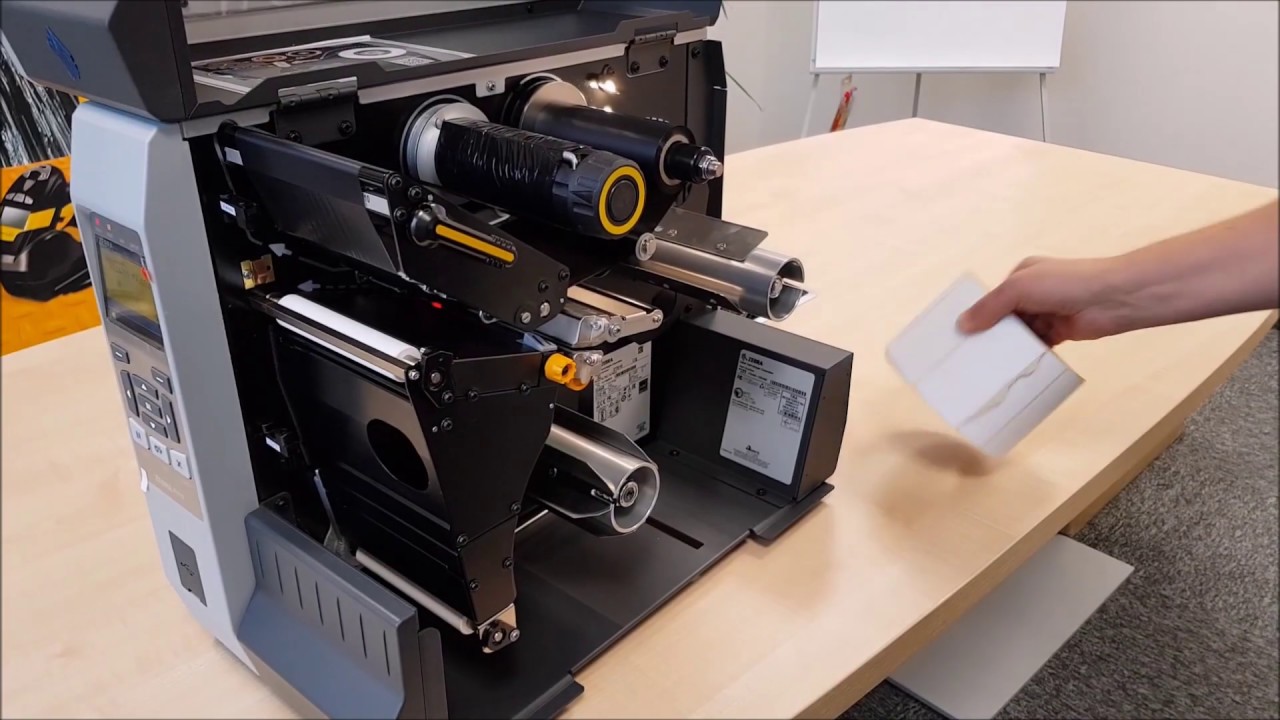
How to fix ink ribbon error
Printer ribbon error
This error often occurs with barcode printers including direct thermal and thermal transfer printers. If you are using ink ribbon to print barcodes and the machine reports an error, which printing method should you check? Please change the printing method from Direct Thermal Printing to Thermal Transfer.
Wrinkled ink ribbon
If this error occurs, you need to open the ink tank to check if the ink tank is installed correctly and proceed to repair. In addition, you also need to adjust the pressure of the print head to ensure contact with the ink ribbon. You can also tighten the belt to hold the ink in place, because overlapping is the main cause of ink wrinkling.
Uneven printing color, patchy color, white diagonal lines appear
This condition can be caused by two different reasons. Therefore, let's look at each cause and solution below to determine the appropriate course of action.
– If there is too much dust on the barcode paper or ink, you can clean it or stop using the paper and ink roll and replace them with other paper or ink roll.
– If the barcode printer head is dirty, you should wipe it in one direction with a cotton swab dipped in alcohol to avoid dust sticking to the cotton and scratching the printer head.
Ink ribbon is torn or damaged
The ribbon is torn or separated a lot because the ribbon moves slower than the barcode paper, causing ink to accumulate. To fix this, you need to adjust the tension of the ribbon using the adjustment buttons on the printer, this situation will disappear.
Barcode is blurred after printing
The print speed is set at a high level, but the ink you use and the printhead configuration have to heat up slowly, causing inconsistencies and causing ink blurring or even barcode breakage after printing. Therefore, the best solution is to adjust the print speed and printhead temperature to suit the type of paper and ink you are using.
Share:

